

March’s updates focus on expanding Breeze AI across workflows and data management, improving CRM visibility, and making it easier to capture, connect, and act on customer data.
March was a big month for HubSpot, with a strong focus on AI-powered efficiency, better data visibility, and reducing manual effort across the platform.
From major upgrades to Breeze AI to meaningful improvements in CRM usability and data capture, these updates are all about helping teams move faster and make better decisions with less friction.

1. Breeze Assistant for Workflow Actions

Breeze Assistant can now build and edit workflow actions directly from natural language prompts, replacing the older “generate with AI” functionality with a more interactive, iterative experience.
Instead of manually configuring each step, you can describe your goal and Breeze will suggest, build, and refine the workflow, prompting for missing information along the way.
This significantly reduces the time and expertise needed to build workflows. Teams can move faster, test ideas more easily, and scale automation without relying on a small number of technical users.
2. Create Calculation Properties with Breeze
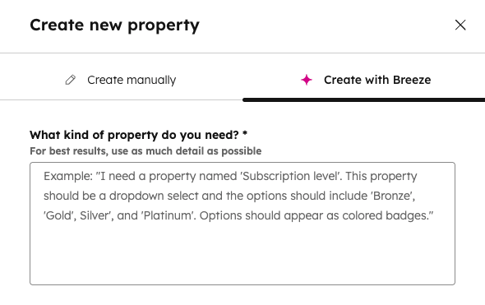
You can now generate calculated property formulas by simply describing what you need in plain English. Breeze supports multiple calculation types, including custom equations and time-based logic like “time since” or “time between.”
It removes the need to understand formula syntax or build logic manually.
Creating advanced data structures becomes far quicker and more accessible. This is especially valuable for reporting, segmentation, and operational workflows that rely on calculated fields.
3. Improved Company & Contact Record Layouts
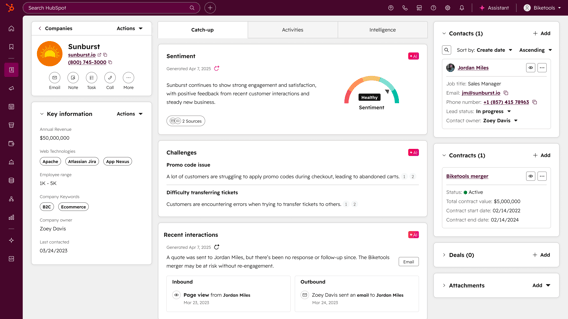
HubSpot has redesigned CRM records to make them more intuitive and actionable. New “Catch-up” cards, powered by Breeze, surface key insights, highlight risks, and suggest next steps.
Alongside this, the updated timeline includes better filtering and a dedicated overdue tasks section, while new layout customisation options allow teams to structure records around how they work.
Reps and marketers can understand the full context of a contact or company faster, reducing time spent navigating records and increasing time spent taking meaningful action.
4. Google Drive Integration for Knowledge Vaults
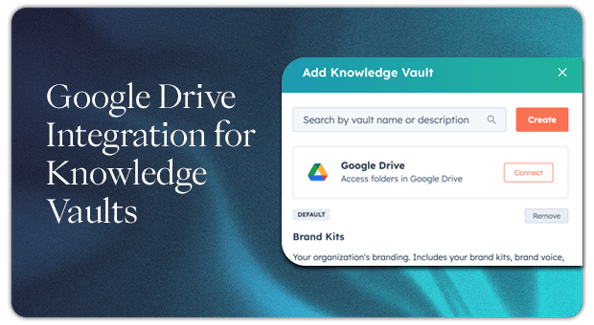
You can now connect entire Google Drive folders as sources for Knowledge Vaults in Breeze Studio. Content is indexed and made searchable for AI agents, while still respecting Drive permissions.
This means agents can reference up-to-date documents, reports, and files without needing manual uploads or duplication.
Your AI outputs become more accurate and trustworthy, while your team avoids maintaining duplicate knowledge bases across systems.
5. Autocapture Website Clicks
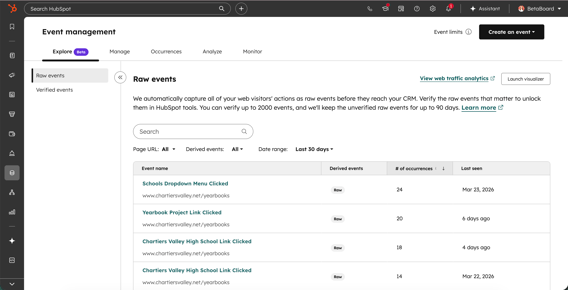
HubSpot now automatically tracks user interactions across your website; including clicks on buttons, links, and navigation elements, without any additional setup.
Once captured, key interactions can be promoted into verified events and used across reporting, workflows, and segmentation.
You gain immediate access to deeper behavioural insights without relying on developers or manual event tracking, helping you better understand and act on user intent.
6. Connection Insights
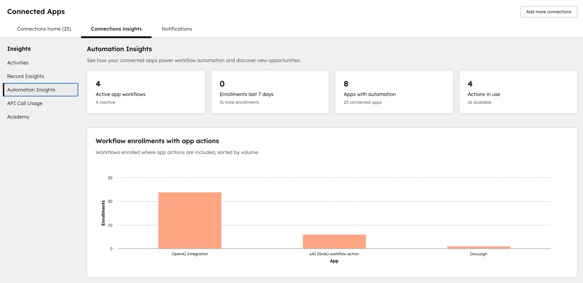
Connection Insights introduces a new centralised view within Connected Apps, giving you visibility into how integrations are performing across your HubSpot account.
It surfaces data such as API usage, automation involvement, app activity, and disconnect history, with direct links to take action where needed.
Instead of troubleshooting issues reactively, you can proactively monitor and manage your integrations, reducing downtime and improving overall system reliability.
7. Customer Agent Tester Enhancements
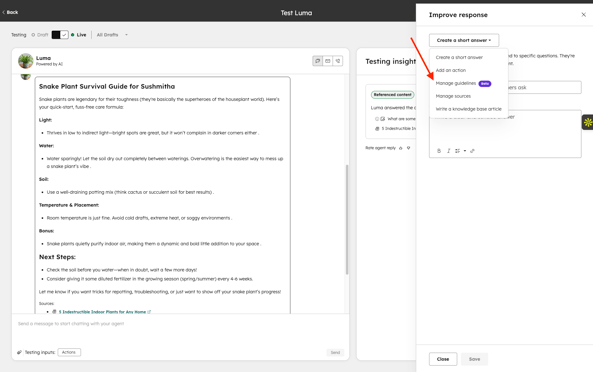
The Customer Agent Tester now supports file attachments - including documents, images, and videos, allowing you to test how your agent responds to real-world inputs.
There’s also a new shortcut to “Manage guidelines” directly from the Improve Response panel, making it easier to refine tone, behaviour, and response style mid-testing.
You can test more realistic scenarios and iterate faster, leading to higher-quality AI responses and a better customer experience once deployed.
8. Differentiating Internal vs External Job Changes
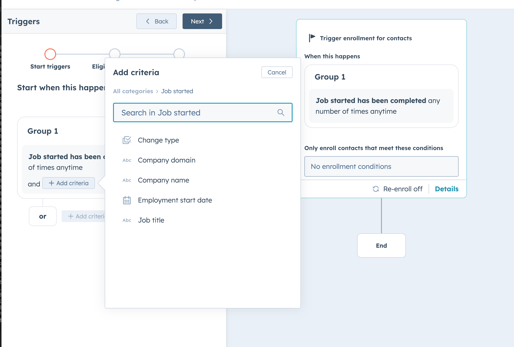
HubSpot has improved job change signals to distinguish between internal changes (like promotions) and external moves (new employers).
This adds an extra layer of context that can be used in workflows, lists, and segmentation.
You can tailor outreach more effectively - treating promotions as expansion opportunities and external moves as new business triggers - leading to more relevant and timely engagement.
9. WhatsApp Improvements
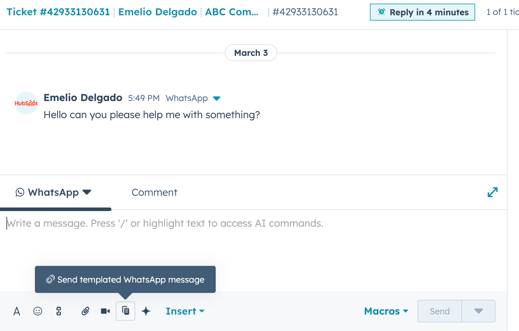
WhatsApp has been significantly upgraded with a dedicated workspace, improved template management, enhanced reporting, and the ability to send message templates at any time during an active conversation.
There’s also better alignment with HubSpot’s broader messaging tools, creating a more unified experience.
Teams can manage WhatsApp as a core communication channel more effectively, with fewer restrictions and better visibility into performance.
10. Set Default Property Values
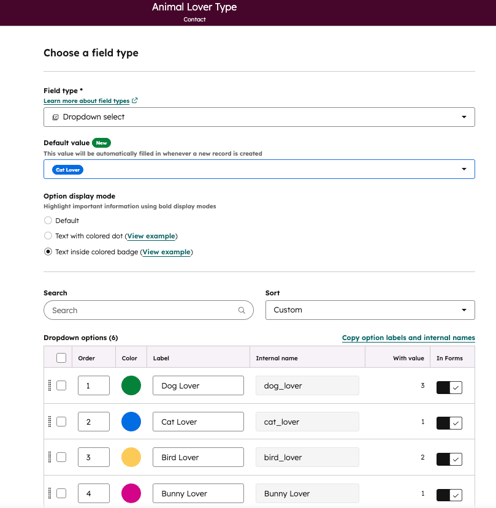
Admins can now define default values for properties, which are automatically applied when new records are created.
This removes the need for workflows that exist purely to populate fields and ensures consistent data from the start.
You improve data quality, reduce manual input, and simplify your setup, making your CRM easier to manage and more reliable for reporting and automation.
Why These Updates Matter as Whole
March’s updates reinforce a clear trend: HubSpot is reducing the effort required to get value from its platform.
With AI taking on more of the heavy lifting, better visibility across your tools and data, and fewer manual processes to manage, teams can operate more efficiently without adding complexity.
For businesses already using HubSpot day-to-day, these updates aren’t just incremental -they’re practical improvements that can drive real gains in productivity, data quality, and customer experience.
If you want help turning these updates into a real-world improvements inside your HubSpot portal, we're always here to talk through what's possible.