


This month's updates focus on helping teams spend less time switching between tools, automate more of the sales process, uncover better buying signals and create content that's built for the way people now search.
Below are the ten updates we think will have the biggest impact for growing businesses using HubSpot.
![Top 10 Product Updates [June]](https://weareforbidden.com/hs-fs/hubfs/Top%2010%20Product%20Updates%20%5BJune%5D.jpg?width=660&height=371&name=Top%2010%20Product%20Updates%20%5BJune%5D.jpg)
1. Teamwork: HubSpot's New AI Workspace
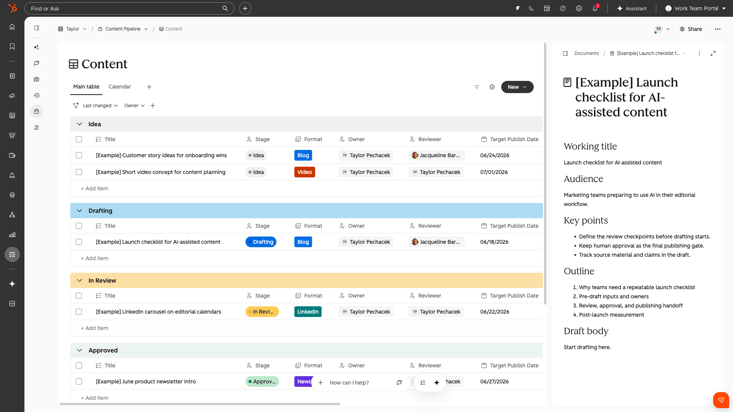
One of the most significant announcements this month is HubSpot Teamwork.
Rather than treating AI as a standalone assistant, Teamwork creates a shared workspace where your team and AI agents can work together on projects, tasks and processes while remaining connected to your Smart CRM.
This means marketing, sales and service teams can collaborate alongside AI without constantly moving between tools.
Businesses are increasingly juggling AI tools, project management platforms and CRMs separately. Teamwork brings those together into one connected workspace, reducing context switching and keeping customer data at the centre of every task.
Best for:
- Cross-functional teams
- RevOps
- Marketing project management
- Sales collaboration
2. Prospecting Agent Is Now Available on Every Paid Hub
Previously limited to certain Hub editions, Prospecting Agent is now available across all Starter, Professional and Enterprise subscriptions, regardless of which Hub you're paying for.
That means many more businesses can now use AI to research prospects, prepare outreach and identify the next best opportunities.
AI-powered prospecting is no longer reserved for enterprise businesses. Smaller teams can now save significant time on prospect research without additional software.
3. Prospecting Agent Now Connects with Seamless
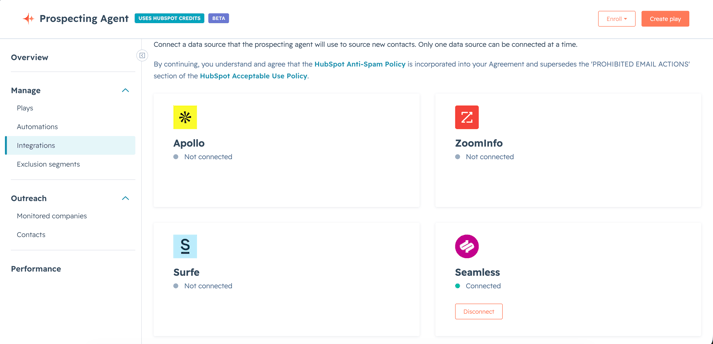
HubSpot has also expanded Prospecting Agent by integrating directly with Seamless.
The agent can now search Seamless' database to find contacts that match your ideal customer profiles, making prospecting even faster.
Instead of manually researching companies and decision-makers, AI can suggest relevant contacts automatically.
Building prospect lists often takes hours but this update dramatically reduces that effort, while helping sales teams spend more time selling and less time researching.
4. Create Your Own Buyer Intent Signals
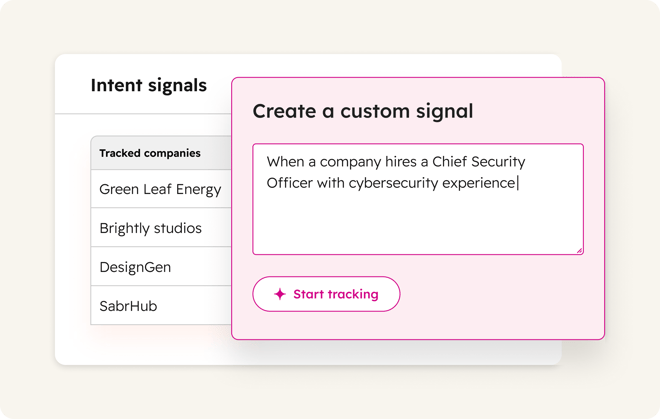
Rather than relying only on HubSpot's predefined intent signals, you can now describe, in plain English-the buying signals that matter to your business.
For example:
-
Companies announcing new funding
-
Hiring for key roles
-
Publishing RFPs
-
Launching new products
-
Opening new locations
HubSpot will monitor these events and surface matching companies, complete with source citations.
Every business has different indicators that suggest someone is entering a buying cycle.
Being able to define your own signals means you can identify opportunities earlier and prioritise outreach based on events that genuinely matter to your market.
5. Meetings Are Now Fully Automated in Workflows
Meetings have finally become first-class citizens inside HubSpot Workflows.
You can now build automations using meeting properties and meeting events, allowing you to trigger actions when meetings are booked, updated or completed.
Examples include:
-
Automatically creating follow-up tasks
-
Updating deal stages
-
Sending personalised follow-up emails
-
Assigning internal actions
-
Triggering customer journeys
Sales teams spend far too much time completing admin after meetings and this update helps automate those repetitive processes, ensuring every meeting moves opportunities forward without manual effort.
6. Customer Agent Can Now Reply to Form Submissions
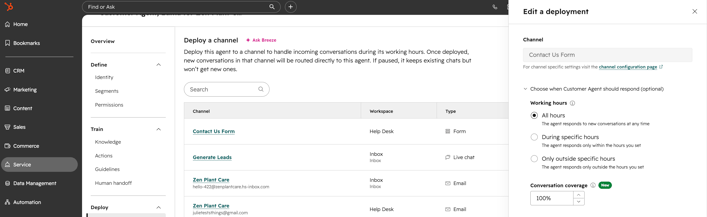
HubSpot's Customer Agent has gained another practical capability - it can now automatically respond to inbound form submissions directly from Help Desk or Inbox.
Customers receive an immediate reply while your team stays informed inside HubSpot.
Why does this matter? Well , faster responses create better customer experiences; even when your team isn't immediately available, Customer Agent can acknowledge enquiries and keep conversations moving until someone takes over.
7. HubSpot Comes to Microsoft 365 Copilot
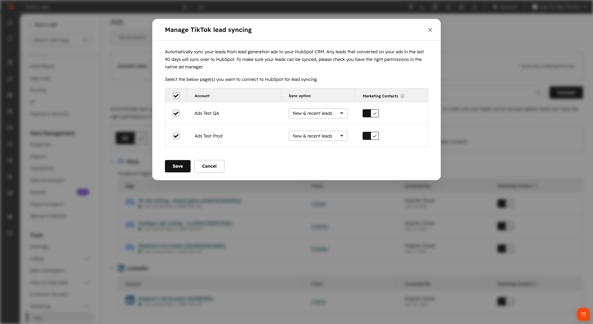
The new HubSpot Agent for Microsoft 365 Copilot allows users to access HubSpot data directly inside Microsoft Copilot.
Sales teams can summarise active deals.
Support teams can review open tickets.
Customer Success teams can compare support outcomes across channels.
All without leaving Microsoft's AI environment.
Many businesses already use multiple AI assistants every day and now rather than forcing users back into HubSpot, customer context can now travel with them; making AI more useful wherever work happens.
8. Breeze Projects Becomes a True AI Workspace
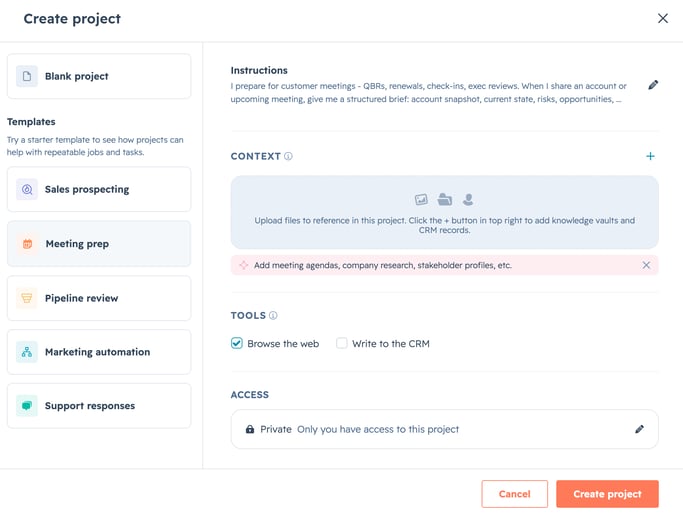
Breeze Projects has received one of its biggest upgrades yet, making it far more collaborative, contextual and useful for everyday work.
Alongside a redesigned workspace, you can now upload files directly into projects, reference CRM records, search the web and even let Breeze take actions within HubSpot.
But perhaps the biggest improvement is how projects now work across teams.
Projects can now be shared with colleagues with permission controls, started from pre-built templates for common use cases like sales prospecting, meeting preparation and customer support, and powered by project memory that remembers previous instructions, decisions and preferences as work progresses.
Rather than starting from scratch every time, Breeze continues building on what your team has already created.
By combining uploaded files, CRM data, web search and project memory in one shared workspace, Breeze can deliver more accurate, consistent outputs across your entire team. Templates also remove the blank-page problem, helping teams get value from AI immediately instead of spending time building prompts from scratch.
For businesses looking to standardise processes while making AI genuinely collaborative, this is a significant step forward.
9. Better Form Reporting with AI Insights
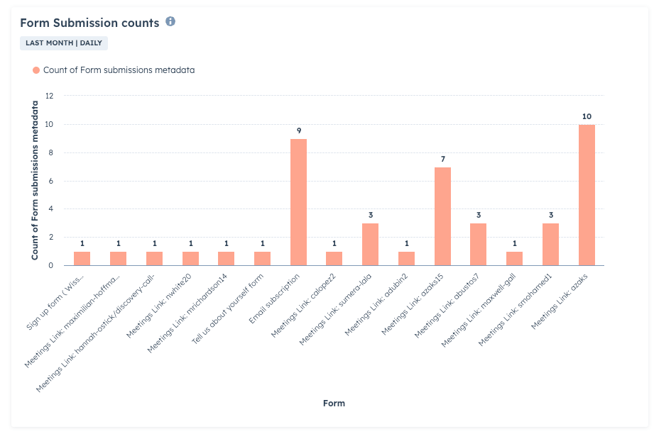
The new Analyse tab introduces richer reporting, AI-generated insights and the ability to customise dashboards directly from the Forms tool.
You can also edit reports without leaving the page and even replace the default Analyse tab with dashboards tailored to your business.
Understanding how forms perform shouldn't require jumping between multiple reports.
This update makes it much easier to optimise conversion performance and identify opportunities for improvement.
10. Turn AEO Recommendations into Blog Posts
As AI search continues to reshape SEO, HubSpot is making it easier to create content designed for answer engines.
The Content Agent can now generate a blog post directly from an AEO (Answer Engine Optimisation) recommendation.
Instead of identifying a visibility gap and then writing the article manually, HubSpot can now help produce a first draft automatically.
AI search is changing how people discover businesses and this update helps marketers move from insight to published content much faster; all whilst building visibility across AI-powered search experiences.
Why These Updates Matter as Whole
June's updates continue HubSpot's shift towards becoming an AI-powered customer platform rather than simply a CRM.
The biggest themes this month are clear:
- AI is becoming embedded into everyday workflows.
- Sales teams are getting smarter prospecting tools.
- Customer service is becoming increasingly automated.
- Marketing teams can create and optimise content faster.
- Businesses can access HubSpot intelligence wherever they work.
For growing organisations, these updates represent meaningful opportunities to reduce manual work, improve customer experiences and help teams focus on higher-value activities.
If you're unsure which of these updates could have the biggest impact on your business, get in touch with Forbidden. We'll help you prioritise the features that deliver the greatest commercial value and ensure you're getting the most from HubSpot.
If you want help turning these updates into a real-world improvements inside your HubSpot portal, we're always here to talk through what's possible.